Hotpoint Refrigerator Manual: A Comprehensive Guide
This guide offers detailed instructions for Hotpoint refrigerators‚ covering model numbers‚ troubleshooting‚ maintenance‚ and safety – ensuring optimal appliance performance and longevity.
Understanding Your Hotpoint Refrigerator
Hotpoint refrigerators are designed for reliable performance‚ offering various features like adjustable shelving and precise temperature control. Familiarizing yourself with your specific model is crucial for efficient operation. Understanding the components – from the freezer and refrigerator sections to the water dispenser (if equipped) – allows for proper usage and maintenance.
Hotpoint offers diverse models‚ including top-freezer and bottom-freezer configurations‚ each with unique characteristics. Knowing your refrigerator’s capacity and features maximizes its utility. Regularly checking the temperature settings ensures food preservation‚ while proper cleaning maintains hygiene. This section will guide you through the basics‚ preparing you for more detailed information on troubleshooting and care.

Locating the Model Number
Finding your Hotpoint refrigerator’s model number is essential for accessing the correct manual and ordering replacement parts; it’s typically located on an interior sticker.
Where to Find the Model Number Sticker
Locating the model number sticker on your Hotpoint refrigerator is the first step towards accessing crucial support information. Typically‚ this sticker isn’t prominently displayed on the exterior. Instead‚ it’s usually found inside the refrigerator compartment. A common location is on an inner panel‚ often behind the crisper or salad drawers.
Carefully remove the drawers to inspect the surrounding walls. Alternatively‚ check along an internal side wall of the refrigerator. The sticker‚ often silver or white‚ will contain vital details including the model number and serial number. This information is critical when downloading the user manual‚ ordering parts‚ or contacting customer support for assistance with your specific Hotpoint appliance.
Decoding Hotpoint Serial Numbers
Hotpoint serial numbers are more than just random characters; they contain valuable information about your refrigerator’s manufacturing details. These alphanumeric codes typically reveal the date of manufacture and the origin of the appliance. While the exact format can vary‚ the serial number often includes a series of letters and numbers that pinpoint when and where your refrigerator was produced.
Understanding this code can be helpful when researching compatibility for replacement parts or determining if your appliance falls within a specific recall notice. Although fully deciphering the code can be complex‚ the serial number‚ alongside the model number‚ provides a unique identifier for your Hotpoint refrigerator‚ aiding in accurate support and service.

Downloading the User Manual
Accessing your Hotpoint refrigerator’s manual is easy through the official Hotpoint support website or reliable third-party databases for quick reference.
Official Hotpoint Support Website
The official Hotpoint support website is the primary source for downloading the most accurate and up-to-date user manuals for your refrigerator model. Navigating the site typically involves entering your appliance’s model number into a search bar‚ ensuring you receive the correct documentation.
Hotpoint provides manuals in PDF format‚ allowing for easy viewing and printing. Beyond the manual itself‚ the website often features helpful FAQs‚ troubleshooting guides‚ and video tutorials addressing common issues. You can also find information regarding warranty details and schedule service appointments if needed;
Direct access to the official resources guarantees compatibility and reliability‚ making it the recommended starting point for any manual-related inquiries. The website is regularly updated to reflect changes in models and features.
Third-Party Manual Databases
Several third-party websites specialize in archiving appliance manuals‚ offering an alternative if the official Hotpoint site doesn’t immediately yield results. These databases often compile manuals from various manufacturers‚ including Hotpoint‚ and can be useful for older or discontinued models.
However‚ it’s crucial to exercise caution when using these resources. Verify the manual’s accuracy by comparing the model number and features described to your specific refrigerator.
While convenient‚ third-party sites may not always have the latest revisions or complete documentation. Always prioritize the official Hotpoint website for the most reliable information‚ using these databases as a supplementary resource when necessary.
Refrigerator Features and Controls
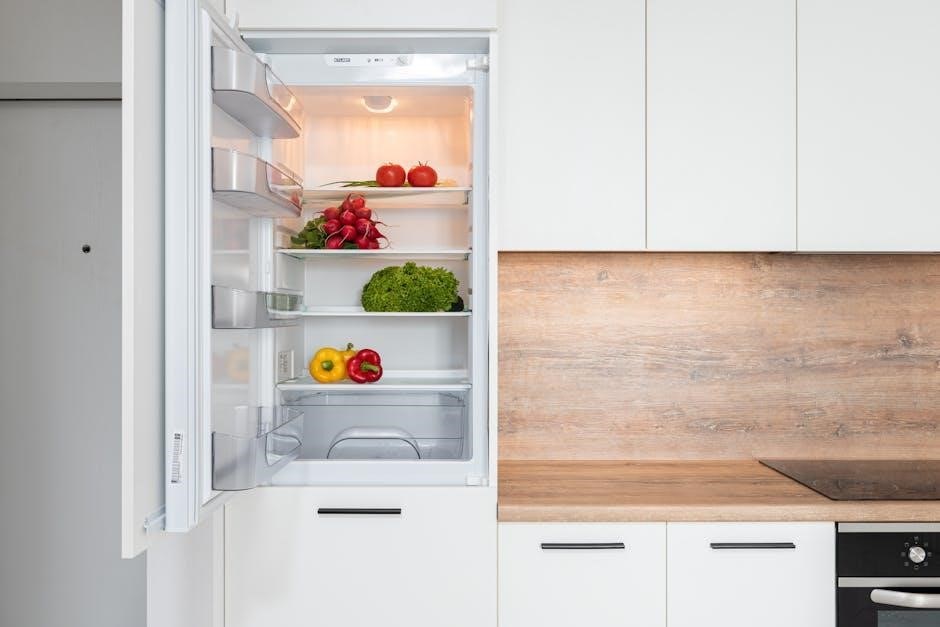
Explore adjustable shelving‚ temperature controls‚ and specialized compartments within your Hotpoint refrigerator for optimal food storage and organization‚ enhancing usability.
Temperature Control Settings
Hotpoint refrigerators utilize intuitive temperature controls‚ typically dials or digital displays‚ to regulate both the refrigerator and freezer compartments. Understanding these settings is crucial for preserving food quality and preventing spoilage. Generally‚ recommended refrigerator temperatures fall between 37°F (3°C) and 40°F (4°C)‚ while freezers should be maintained at 0°F (-18°C).
Adjusting the dial to higher numbers usually indicates warmer temperatures‚ and lower numbers signify colder settings. Digital models offer precise temperature selection. Regularly check the actual temperature using a thermometer to ensure accuracy. Some models feature specialized settings like ‘Quick Cool’ or ‘Energy Saver’ modes‚ optimizing performance based on your needs. Proper temperature management extends food shelf life and minimizes energy consumption.
Adjustable Shelving and Door Bins
Hotpoint refrigerators are designed with versatility in mind‚ featuring adjustable shelving and door bins to maximize storage space. Shelves can often be repositioned or removed entirely to accommodate items of varying heights and widths‚ like tall pitchers or large platters. Door bins provide convenient access to frequently used items such as condiments‚ beverages‚ and dairy products.
Many models include spill-proof shelves to contain messes and simplify cleanup. Adjusting the door bins allows customization based on your storage preferences. Properly utilizing these adjustable features optimizes organization‚ prevents overcrowding‚ and ensures efficient use of the refrigerator’s interior space‚ leading to better food visibility and accessibility.
Troubleshooting Common Issues
This section details solutions for typical Hotpoint refrigerator problems‚ including cooling failures‚ freezer malfunctions‚ and water dispenser issues‚ for quick resolutions.
Refrigerator Not Cooling
If your Hotpoint refrigerator isn’t cooling‚ first check the power supply and ensure it’s properly plugged in. Verify the temperature control settings aren’t set too warm or accidentally turned off. A dirty condenser coil restricts airflow‚ so clean it thoroughly – disconnect power first!
Inspect the door seals for gaps; damaged seals allow warm air to enter. A malfunctioning evaporator fan motor hinders cold air circulation. Also‚ examine the start relay and overload protector for potential failures. If the refrigerator is overfilled‚ it can impede airflow. Finally‚ a faulty thermostat could be the root cause‚ requiring professional diagnosis and repair.
Freezer Not Freezing
When your Hotpoint freezer fails to freeze‚ begin by confirming the power connection and temperature settings. Ensure the freezer isn’t overloaded‚ as this restricts airflow. Inspect the condenser coils for dust accumulation‚ cleaning them after disconnecting power. A faulty evaporator fan motor prevents cold air distribution within the freezer compartment.
Check the door seals for any damage or gaps‚ allowing warm air infiltration. A defective defrost system – including the heater‚ timer‚ or thermostat – can cause icing buildup. Also‚ examine the start relay and overload protector for potential issues. If problems persist‚ professional service is recommended for diagnosis and repair.
Water Dispenser Problems
If your Hotpoint refrigerator’s water dispenser isn’t working‚ first verify the water supply line is connected and the water supply valve is fully open. Check for kinks or freezing within the water line itself. A clogged water filter is a common culprit; replace it according to the manufacturer’s recommendations – typically every six months;
Inspect the dispenser’s solenoid valve for malfunctions‚ preventing water flow. Low water pressure can also cause issues‚ so test your home’s water pressure. If the dispenser drips continuously‚ the valve may be damaged. For persistent problems‚ consult a qualified technician for diagnosis and repair.

Maintenance and Cleaning
Regular cleaning and defrosting are crucial for optimal performance. Establish a schedule to maintain hygiene‚ prevent odors‚ and ensure efficient operation of your Hotpoint.
Regular Cleaning Schedule
Maintaining a consistent cleaning schedule is vital for your Hotpoint refrigerator’s longevity and hygiene. Weekly‚ wipe down spills immediately and clean shelves with warm‚ soapy water. Monthly‚ remove all shelves and drawers for a thorough wash‚ and don’t forget to clean the door gaskets to ensure a tight seal.
Every three months‚ clean the condenser coils – located at the back or bottom of the fridge – to improve efficiency. Twice a year‚ perform a deep clean‚ including the exterior surfaces and the ice maker (if applicable). Regularly check and replace the water filter‚ if your model has one‚ following the manufacturer’s guidelines. This prevents buildup and ensures fresh-tasting water.
Defrosting Procedures
Defrosting your Hotpoint refrigerator prevents ice buildup‚ ensuring optimal performance. For manual defrost models‚ unplug the refrigerator and remove all food items. Place towels inside to absorb melting ice. Allow ample time for complete defrosting – typically several hours. Avoid using sharp objects to scrape ice‚ as this can damage the interior.
Frost-free models generally don’t require manual defrosting‚ but occasionally‚ ice can accumulate. If this happens‚ unplug the refrigerator and follow the same procedure as manual defrost models. Once defrosted‚ thoroughly clean and dry the interior before plugging it back in and restocking with food. Regular defrosting improves efficiency and extends the refrigerator’s lifespan.
Replacing Parts
Replacing faulty components restores your Hotpoint refrigerator’s functionality. Identify the correct part and source it from authorized suppliers for optimal compatibility and safety.
Identifying Replacement Parts
Accurate part identification is crucial for successful Hotpoint refrigerator repairs. Begin by consulting your user manual‚ which often includes exploded diagrams detailing component locations and part numbers. If the manual is unavailable‚ locate the model number – typically found on a sticker inside the refrigerator compartment – and utilize online parts databases.
Carefully compare the visual appearance of the old part with potential replacements‚ paying attention to connectors‚ dimensions‚ and any specific markings. Websites specializing in appliance parts often allow you to input your model number to filter compatible options. When in doubt‚ contact Hotpoint support or a qualified appliance technician for assistance to ensure you order the correct replacement part‚ avoiding compatibility issues and further complications.
Finding Parts Suppliers
Locating reliable suppliers for Hotpoint refrigerator parts is essential. Several options exist‚ ranging from official Hotpoint sources to independent retailers. The Hotpoint website often directs users to authorized parts distributors. Numerous online appliance parts retailers‚ such as AppliancePartsPros and RepairClinic‚ offer extensive catalogs and search functionalities based on model number.
Local appliance repair shops frequently stock common parts and can provide expert advice. When choosing a supplier‚ consider factors like price‚ shipping costs‚ return policies‚ and customer reviews. Ensure the supplier offers genuine Hotpoint parts or high-quality compatible alternatives to maintain appliance performance and safety. Comparing prices across multiple suppliers is recommended.

Safety Precautions
Prioritize electrical safety and food safety when operating your Hotpoint refrigerator; always follow guidelines to prevent hazards and ensure proper appliance use.
Electrical Safety
Always ensure the refrigerator is properly grounded to prevent electric shock. Never use extension cords or adapters‚ as they can overheat and pose a fire risk. Inspect the power cord regularly for damage; if found‚ immediately discontinue use and contact a qualified technician for replacement.
Avoid operating the refrigerator with a damaged power cord or plug. Do not immerse the refrigerator or its power cord in water or other liquids. Disconnect the refrigerator from the power supply before cleaning or performing any maintenance. Keep the area around the refrigerator clear of flammable materials. If you experience frequent electrical issues‚ consult a professional electrician to assess your home’s wiring.
Remember‚ improper electrical handling can lead to serious injury or property damage. Prioritize safety at all times when interacting with your Hotpoint refrigerator.
Food Safety Guidelines
Maintain consistent refrigerator temperatures below 40°F (4°C) to inhibit bacterial growth. Properly wrap and store food in airtight containers to prevent cross-contamination and maintain freshness. Avoid overcrowding the refrigerator‚ as this can impede airflow and affect cooling efficiency.
Regularly discard expired or spoiled food items to prevent illness. Follow the “first in‚ first out” principle when organizing food‚ using older items before newer ones. Be mindful of safe thawing practices – thaw frozen foods in the refrigerator‚ in cold water‚ or in the microwave. Never thaw food at room temperature.
Ensure raw meats are stored on the bottom shelf to prevent dripping onto other foods. Practice good hygiene by washing hands thoroughly before handling food.
Hotpoint Refrigerator Models
Hotpoint offers diverse refrigerators‚ including top-freezer‚ bottom-freezer‚ and specialty models‚ each designed with varying capacities and features to suit diverse household needs;
Top-Freezer Refrigerator Models
Hotpoint’s top-freezer refrigerators represent a classic and efficient cooling solution‚ often favored for their affordability and practical design. These models‚ like the 15.6 Cu. Ft. options‚ typically feature a full-width freezer compartment positioned above the refrigerator section‚ maximizing accessibility to frequently used fresh foods.
They are known for their reliable performance and straightforward controls‚ making them a suitable choice for smaller kitchens or as a secondary refrigerator. Recessed handle designs offer a streamlined appearance‚ while interior features prioritize organization with adjustable shelving and door bins. These refrigerators generally provide a balance between storage capacity and energy efficiency‚ making them a popular choice for many households seeking a dependable cooling appliance.
Bottom-Freezer Refrigerator Models
Hotpoint bottom-freezer refrigerators offer a modern design and ergonomic benefits‚ placing the frequently accessed refrigerator compartment at eye level. This configuration minimizes bending‚ enhancing convenience for users of all ages. These models often boast larger capacities and advanced features compared to top-freezer counterparts‚ catering to families with substantial storage needs.
Interior layouts typically include spill-proof shelving‚ crisper drawers for optimal produce preservation‚ and adjustable door bins for customizable organization. Energy efficiency is a key consideration in these designs‚ with many models incorporating advanced cooling technologies. Bottom-freezer refrigerators represent a blend of style‚ functionality‚ and convenience‚ making them a popular choice for contemporary kitchens.
The Grenfell Tower Fire and Hotpoint Refrigerators
Investigations revealed a Hotpoint fridge-freezer model was the origin of the Grenfell Tower fire‚ prompting recalls and raising serious safety concerns regarding appliance design.
Investigation into Faulty Models
Following the Grenfell Tower tragedy‚ an immediate and thorough investigation was launched by the government to determine the specific Hotpoint refrigerator model responsible for initiating the devastating fire. Initial findings quickly focused on the Hotpoint FF175BP model‚ manufactured between March 2006 and July 2009‚ as a potential source. The investigation centered on a design flaw within the appliance’s defrost heater compartment‚ allowing flammable materials to accumulate and ignite.
Experts discovered that the design permitted food debris and other combustible substances to come into contact with the defrost heater‚ creating a significant fire hazard. This critical flaw was identified as the primary cause of the fire’s outbreak and rapid spread. The investigation’s findings were instrumental in prompting a large-scale recall of affected models‚ aiming to mitigate further risks and ensure public safety.
Hotpoint’s Response and Recall Information
In response to the Grenfell Tower fire investigation‚ Hotpoint issued a public statement urging owners of the implicated FF175BP model‚ and similar variants manufactured within the specified timeframe‚ to immediately contact them. The company established a dedicated hotline and online portal to facilitate the recall process and provide support to concerned customers. Hotpoint offered free-of-charge repairs or replacements for affected appliances‚ prioritizing safety and customer reassurance.
Approximately 64‚000 units were subject to the recall‚ representing a significant undertaking for the manufacturer. Hotpoint actively collaborated with authorities to raise awareness about the recall and ensure maximum participation. They also committed to enhancing their quality control procedures to prevent similar incidents from occurring in the future‚ demonstrating a commitment to product safety.
Warranty Information
Hotpoint refrigerators come with a standard warranty covering parts and labor; registration is crucial for streamlined service and to validate coverage details.
Understanding Your Warranty Coverage
Hotpoint refrigerator warranties typically offer coverage for a specific period‚ often starting from the date of original purchase. The standard warranty generally includes coverage for parts and labor required to repair defects in materials or workmanship. However‚ the length of coverage can vary depending on the specific model and any extended warranty plans purchased.
It’s essential to review the warranty documentation carefully to understand what is covered and what is not. Common exclusions include damage caused by misuse‚ improper installation‚ power surges‚ or normal wear and tear. Keep your proof of purchase readily available‚ as it’s required to initiate a warranty claim. Understanding these details ensures a smooth process should you encounter any issues with your appliance.
Registering Your Appliance
Registering your Hotpoint refrigerator is a crucial step for several reasons. It validates your purchase date for warranty purposes‚ simplifying any future claim processes. Registration allows Hotpoint to directly contact you with important safety notifications‚ product updates‚ or recall information related to your specific model.
Typically‚ you can register online through the official Hotpoint support website using your model number and serial number. Alternatively‚ some retailers offer registration services at the time of purchase. Keeping your appliance registered ensures you receive timely alerts and maximizes the benefits of your warranty‚ providing peace of mind and efficient customer support.
Related Posts

raspberry pi zero w aprs sdr manual
Dive into the world of Automatic Packet Reporting System (APRS)…

indesit washer dryer machine manual
Indesit Washer Dryer Machine Manual: A Comprehensive Guide This manual…

kn cob b lpm user manual
Kidde KN-COB-B-LPM User Manual: Article Plan This comprehensive guide details…